Tier 2 Backlinks · Web 2.0
Blog posts that link to your guest post. That's what gets it crawled.
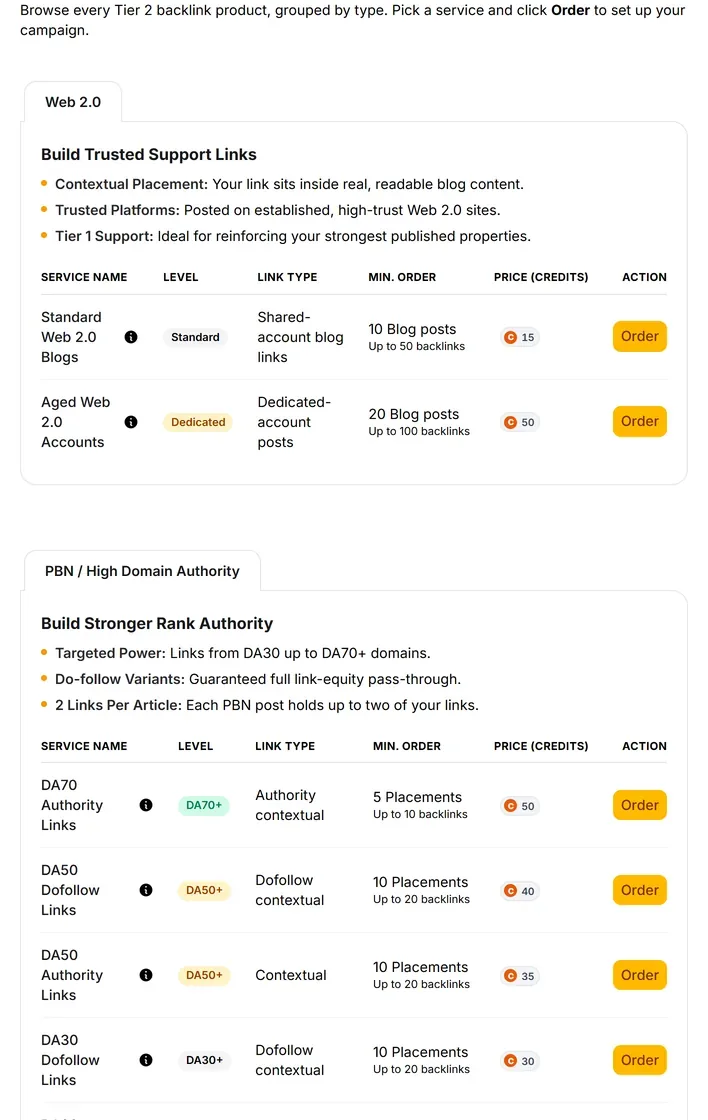
Each one is a real post on a hosted blog, with your link in the body. Standard accounts from $8.40, aged accounts from $30. Never pointed at your money site.
- Google reaches your guest post by following links. — Right now, almost nothing links to it.
- Posts with content, not bare profile rows. — Each unit is a blog post carrying your link in the body.
- Up to five of your links per post. — A ceiling, not a promise.
- Standard blogs from $8.40. — Shared accounts. This is the volume layer, and where most pages should start.
- Aged accounts from $30. — Dedicated accounts that already carry history. Save them for one page.
- Your money site isn't selectable. — The client's site and blog are excluded from the asset list by design.
- Anchors come from rankings and Search Console. — Spread across the links, or typed by you.
- Two live products. That's the shelf. — Retired ones stay off the menu.
Blog posts with your link inside.
Aimed at the page you already paid for.
You paid for a guest post. Almost nothing links to it.
Google finds and re-visits a page by following links to it.
A link nobody links to is a link Google mostly ignores.
A Web 2.0 unit is a post on a hosted blog.
Heading, body, and your link sitting inside it.
It points at your guest post. Never at your client's own website.
No card required. See every tool and every price before you spend anything.
The part everyone talks around
Web 2.0 isn't dead. Pointing it at money sites is.
You've heard the dismissal. "Web 2.0 links don't work anymore."
Here's what usually happened. Someone aimed a pile of them at a homepage.
That looks manufactured, and the platform got the blame.
Never point these links directly at your main or money website.
Tier 2 links are strong, and they are lower-trust.
Point them at a guest post a real publisher already vouched for.
Now that page has links of its own. It gets crawled more, and it passes more weight home.
Old mechanism. Correct target.
Open both rows before you pick shared or aged.
Free account, no card. Put standard from $8.40 against aged from $30 with a real Tier 1 URL in mind. Most pages want the volume layer first.
No card required. See every tool and every price before you spend anything.
How a run works
Pick the page. Not the site.
The first field decides whether this helps you or hurts you. Everything after it is plumbing.
- 01
Pick the page to strengthen
Articles, releases, guest posts and citations are already listed. Site and blog are excluded by design. You can't select them.
- 02
Choose standard or aged
Standard is shared accounts, from $8.40. Aged is dedicated accounts with existing history, from $30.
- 03
Pool anchors from your own data
Tracked rankings and Search Console, spread across the links. Or type your own.
- 04
Add the extras that apply
Indexer tiers so the posts get crawled. Captcha backup. A custom image per post. Social signals.
- 05
Read the number, then commit
The cost prints on the button that spends it. Cancel while the vendor still has it pending and credits refund.
- 06
Get one branded report
Every order in the publish run, stored on the client record.
What you end up holding
A layer of posts under your best link.
Picture the guest post you paid the most for. Now it has hosted posts linking to it.
- Blog posts carrying your link
- Hosted properties with real content, each holding up to five links to the page you picked.
- The account type you chose
- Shared for volume, or dedicated aged accounts when the page justifies the spend.
- Anchors drawn from real terms
- Pooled from tracked rankings and Search Console, spread across the links.
- One branded report for the run
- Client-ready, covering every order, kept on the client record.
- Crawlable posts, if you buy the indexer
- Optional, and it matters. A link nobody crawls passes nothing at all.
Add indexing if you want the posts to count.
A post nobody crawls passes nothing. Three indexer strengths sit next to the order. Credits don't expire. Decide with the total visible.
No card required. See every tool and every price before you spend anything.
The countable part
Both live products, with today's prices.
- Standard Web 2.0 Blogs
- From $8.40 today. Shared accounts, the volume layer. Each post holds up to 5 of your links.
- Aged Web 2.0 Accounts
- From $30 today. Dedicated accounts carrying existing history. Each post holds up to 5 of your links.
- What one unit is
- A blog post with content, carrying your link in the body.
- Where they point
- Tier 1 pages only — your articles, releases, guest posts and citations. Site and blog excluded by design.
- Anchor text
- Pooled from tracked rankings and Search Console, or typed by you. Spread across the links.
- Placement counts
- Ceilings, not promises. Captcha backup adds a second solving pass, which completes roughly 130% more placements.
- Order extras
- Indexer tiers one to three. Captcha backup. Custom image per post. Social signals.
- Indexing
- Not automatic. Indexer tiers are a paid extra at order time.
- Reporting
- One branded report per publish run.
- Cancellation
- Cancel while the vendor still has it pending and credits refund.
- Minimum order
- We don't publish one. Minimums come from the provider's live catalogue and show on the quantity field.
- Delivery date
- We don't publish one, for this or anything else we sell. The order status moves through its steps in the report.
Dollar figures use the same credit rate the pricing page converts at. Buy credits in bulk and each one costs less. Catalogue prices come from the provider and can move, so the Order button is the price of record.
What it costs to find out
Price standard and aged Web 2.0 blogs before you order one.
The account is free and needs no card. Both live Web 2.0 products sit on screen with their costs. Pick the page you want charged up first.
Creating the account is free. Not a trial that takes your card "for verification" — no card at all, and no call with anyone.
And nothing expires on a timer. Credits sit in the account until you spend them.
When you're ready to spend
$0.35–$0.50
per credit, improving with the volume you commit to
See the full pricing page →What you are not signing
No contract, no minimum, no quote and no call. Buy credits monthly if the volume suits you, or buy a block once and owe nothing after it.
Every deliverable in the platform prints its credit cost on the button that spends it, so you always price the work before you run it.
No card required. See every tool and every price before you spend anything.
Before you ask
The questions we'd ask before pointing this at a client.
- What does a Web 2.0 post do for my SEO?
- It gives a page you already paid for a link of its own. Google finds and re-visits a page by following links to it, and almost nothing links to your guest post today. Posts pointing at it get it crawled more often, and a page that gets crawled keeps passing its value on.
- Aren't Web 2.0 links the oldest trick in the book?
- They are. Pointed at a money site in 2026 they're a liability, which is why the money site isn't selectable here. Pointed at a guest post a real publisher already vouched for, the old mechanism still does its job.
- Will this move my rankings?
- We won't promise that, and nobody honestly can. What these posts do is get a link you already own crawled and keep its value moving. That is one input to a ranking, not the whole of one.
- Do I get a fixed number of backlinks every time?
- No. Each post holds up to five backlinks, which is a ceiling rather than a promise.
- Is aged worth more than standard?
- For one flagship page, often. For broad support across many URLs, usually not. Standard is the volume layer and it is where most campaigns should start.
- Do the posts get indexed automatically?
- No, and nothing indexes itself. Three indexer strengths sit on the order form.
- What if I have no Tier 1 links yet?
- Then buy one first. Place a guest post, run a release, or syndicate an article, and boost it after.
- What does it cost?
- Standard blogs from $8.40, aged accounts from $30. Both are today's catalogue floors, and both print on the Order button before it spends.
Blog posts with your link inside.
Aimed at the page you already paid for.
The guest post you paid the most for is usually the one with the widest gap. It could pass a lot. It passes very little, because nothing points at it.
Point the first Web 2.0 run there. Never at the money site.
Picture that page six months out. Still sitting quiet, or sitting on a layer of hosted posts with a report you can hand over.
P.S. — Create the free account. Put standard and aged on screen. Load a client with real Tier 1 URLs. If the target list refuses the homepage, you're watching the product work. Decide before anything is charged.
No card required. See every tool and every price before you spend anything.
The rest of Tier 2 Backlinks