Tier 2 Backlinks · Campaign Builder
Give every link you bought links of its own, in one run.
Pick the pages to strengthen, pick the platforms, publish once. Your client's own website is not on the list.
- The target list fills itself. — Your published articles, releases, guest posts and citations are already there.
- The money site isn't a choice you can make. — The client's site and blog are excluded from the asset list by design.
- Each page can get its own treatment. — One run can send different platforms at different pages.
- Anchors come from your own data. — Tracked rankings and Search Console, or type your own.
- You read the whole total before you publish. — Building a run and pricing it costs nothing.
- One report, however many products you fired. — Not eight PDFs and a Friday merge.
- Indexing is a choice on the same form. — A link nobody crawls passes nothing.
- The cheapest line item in a run is 40¢. — The biggest is a flagship campaign at $57.20.
Pick the pages. Pick the platforms.
One publish run puts links behind all of them.
You paid for guest posts, press releases and citations.
Google finds and re-visits a page by following links to it.
Almost nothing links to those pages.
A link nobody links to is a link Google mostly ignores.
This sends new links into all of them in one run.
Never at the client's own website. It isn't on the list.
No card required. See every tool and every price before you spend anything.
Why boosting usually goes wrong
Most people aim these links at the wrong page. The builder can't.
Tier 2 links are strong, and they are lower-trust.
Never point these links directly at your main or money website.
Aimed at a homepage, that volume looks unnatural.
Aim it at a guest post a real publisher already vouched for.
That page gets crawled more, and it passes more weight home.
Done by hand, this is one bad paste away from trouble.
So we didn't leave it as advice. The site and blog aren't in the asset list. There's nothing to click past.
Load a client and look at the asset list first.
Free account, no card. Guest posts and releases already on the record show up as boost targets.
No card required. See every tool and every price before you spend anything.
The mechanism
Five steps. And it won't let you do the dangerous thing.
The builder encodes the rule instead of trusting you to remember it on a Friday. Nothing is charged until step five.
- 01
Step one — assets
Pick the pages to strengthen. Articles, releases, guest posts and citations are already listed. Site and blog are excluded. You can't select them.
- 02
Step two — platforms, per page
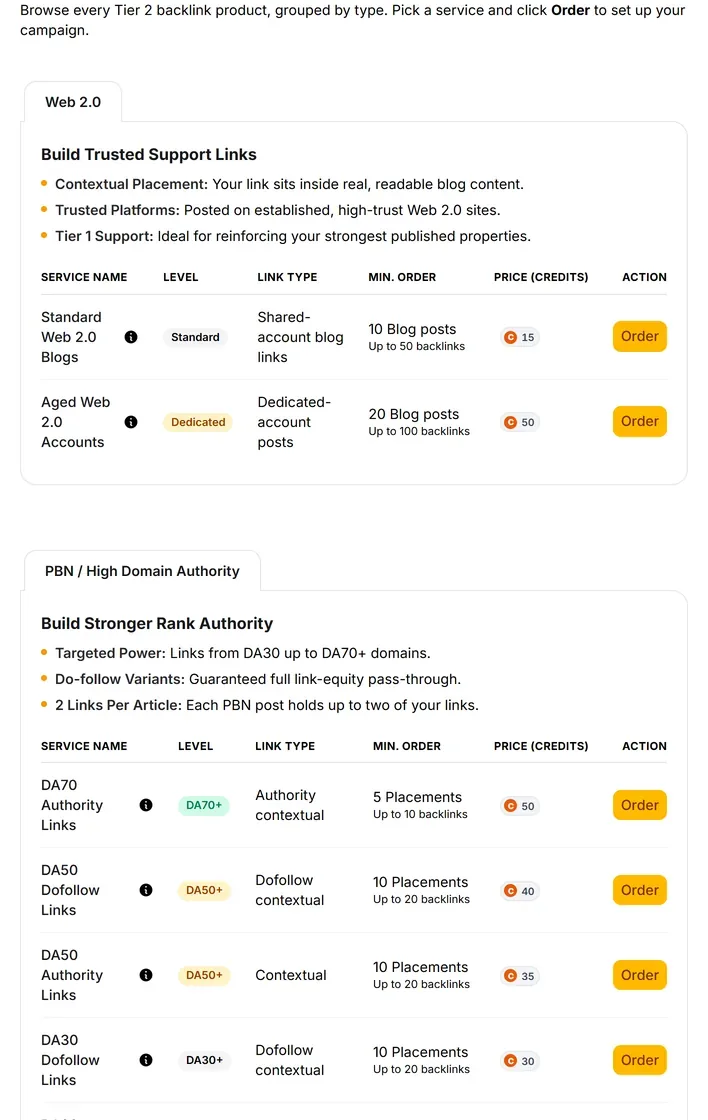
Web 2.0, DA bands, .EDU, wikis, forums, profiles, submissions, comments, shorteners, or a prebuilt campaign. Each page can get different treatment in the same run.
- 03
Step three — keywords from your own data
Anchors pooled from tracked rankings and Search Console, spread across the links. Or typed by you.
- 04
Step four — review the whole cost
Full composition and total on one screen. If the number is wrong, change the mix. You don't find out from a receipt.
- 05
Step five — publish into one report
Many orders, one branded report, stored on the client record. However many products and pages were involved.
- 06
Indexing, on the same form
Three indexer strengths, per order or across the campaign. A Tier 2 link that never gets crawled passes nothing at all.
What you end up holding
One run, one report, and a decision you can defend.
Picture handing a client one PDF that covers the whole campaign. Not eight vendor portals narrated out loud.
- A priced campaign before you buy it
- Review shows the composition and the total. Modelling a run you never place costs nothing.
- A multi-order publish from one press
- Many products across many Tier 1 pages, together rather than reconciled afterwards.
- One branded report for all of it
- Client-ready, every order in the run, kept on the client record.
- Extras where you chose them
- Indexer tiers, captcha backup, article batches, human-quality packs, images and social signals.
- A run that can't reach the money site
- That URL was never in the asset list. Not a note in a help article.
Stop at the review step. Read the number.
The whole run is priced before anything is charged. The cheapest line item is 40¢. Credits don't expire.
No card required. See every tool and every price before you spend anything.
The countable facts
What the builder does, step by step.
- The five steps
- Assets, platforms, keywords, review, finalized.
- Step one — assets
- Published articles, releases, guest posts and citations, filled in for you. Site and blog excluded by design.
- Step two — platforms
- Full catalogue per page. Web 2.0 from $8.40. Authority bands from $8.40. Standalone types from 40¢. Multi-platform campaigns from $17.20.
- Step three — keywords
- Anchors pooled from tracked rankings and Search Console across the run, spread rather than paired one to one. You can type your own.
- Step four — review
- Full cost and composition before anything is charged. Building and pricing costs nothing.
- Step five — finalized
- One multi-order job, one summary, one branded report.
- What a run costs
- It depends what you put in it. The cheapest line item is 40¢. The biggest is a flagship multi-platform campaign at $57.20.
- Order extras
- Indexer tiers one to three, per order or campaign-wide. Captcha backup, a second solving pass that completes roughly 130% more placements.
- Where every link points
- Tier 1 pages only — your articles, releases, guest posts and citations. Never the money site.
- Indexing
- Not automatic. Indexer tiers are a paid extra on the form.
- Reporting
- One branded report per publish run, stored on the client record.
- Cancellation
- Cancel while the vendor still has it pending and credits refund.
- Minimum order
- We don't publish one. Each product's quantity rules come from the provider's live catalogue and show on the form.
- Delivery date
- We don't publish one, for this or anything else we sell. The order status moves through its steps in the report.
Dollar figures use the same credit rate the pricing page converts at. Buy credits in bulk and each one costs less. Placement figures across the catalogue are ceilings, not promises, and prices come from the provider and can move — so the review step and the Order buttons are the price of record.
What it costs to find out
Build the whole campaign and read the total before you buy.
The account is free and needs no card. Composing a run and reading its total costs nothing. Products, quantities and extras, all priced first.
Creating the account is free. Not a trial that takes your card "for verification" — no card at all, and no call with anyone.
And nothing expires on a timer. Credits sit in the account until you spend them.
When you're ready to spend
$0.35–$0.50
per credit, improving with the volume you commit to
See the full pricing page →What you are not signing
No contract, no minimum, no quote and no call. Buy credits monthly if the volume suits you, or buy a block once and owe nothing after it.
Every deliverable in the platform prints its credit cost on the button that spends it, so you always price the work before you run it.
No card required. See every tool and every price before you spend anything.
Before you ask
The questions we'd ask before pointing this at a client.
- What does a builder run actually do for SEO?
- It puts links behind the links you already own. Google finds and re-visits a page by following links to it. Almost nothing points at your guest posts today, so they get crawled rarely and pass very little on. A run fixes that across every one of them at once.
- Why isn't my own website on the target list?
- Because Tier 2 must never hit the money site. These links are strong and lower-trust, and aimed at a homepage they look unnatural. The client's site and blog are excluded from the asset list on purpose, so there is nothing to click past.
- Will this move my rankings?
- We won't promise that, and nobody honestly can. What a run does is give pages you already paid for links of their own, which is what gets them crawled and keeps their value moving. Whether a position changes depends on the rest of the site too.
- How does it know what my Tier 1 assets are?
- They were built in the same platform. Your published articles, releases, guest posts and citations already sit on the client record, so the builder fills its own target list.
- Do I have to use the builder to order?
- No. Every product can be ordered on its own from the catalogue, with the same target picker and the same exclusions.
- Do the links get indexed automatically?
- No, and nothing indexes itself. Three indexer strengths sit on the form, per order or across the campaign.
- What happens if half the campaign fails?
- The report shows what landed, not what was ordered. Captcha backup exists as a second solving pass.
- What's the minimum order on builder runs?
- We don't publish one. Each product's quantity rules come from the provider's live catalogue and appear on the form.
- What does a run cost?
- It depends on what you put in it. The cheapest line item is 40¢. The biggest is a flagship multi-platform campaign at $57.20. The review step totals your exact mix before anything is charged.
Pick the pages. Pick the platforms.
One publish run puts links behind all of them.
The site above your client isn't always writing better content. Often it's putting weight behind pages that already point home, while your best links sit with nothing pointing at them.
Picture two Fridays. In one, you're still reconciling vendor tabs. In the other, you published one reviewed run, the money site was never selectable, and one branded report covers the lot.
The difference is a decision about where the volume points. Not how many more first-tier invoices you can write.
P.S. — Create the free account. Load a client. Stop at the review step. It costs nothing to read the number. If the composition looks like how you already work, you're one press away from shipping it.
No card required. See every tool and every price before you spend anything.
The rest of Tier 2 Backlinks