Project CRM
Run more SEO programs without hiring anyone to run them.
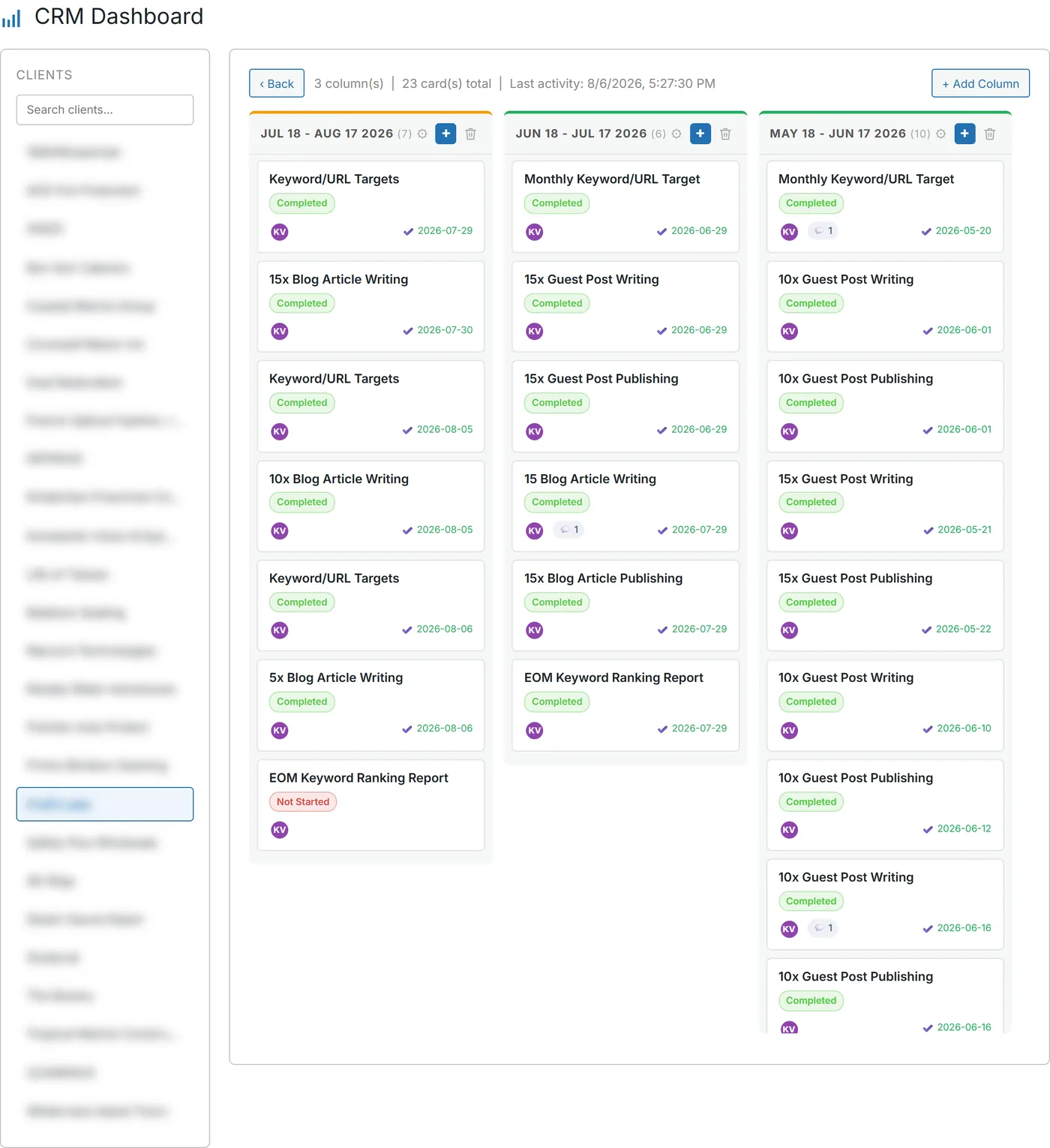
A board per client, and every card opens the tool that does the work. Client and keywords already filled in. The board is free.
- Launch opens the tool prefilled. — Guest post, release, syndication, citations, article — client and keywords already set.
- Nothing gets retyped. — The plan and the order form stop being two separate jobs.
- A campaign writes its own cards. — Finish a plan in Campaign Builder. The column and the cards land with owners on them.
- Internal columns stay private. — Mark a column internal and the client never sees your scope fight.
- Replies land on the card. — Client answers to status mail thread onto the work, not into one person's inbox.
- Drive files ride with the card. — Attachments stay with the deliverable they belong to.
- Mail goes out under your name. — Status emails use your own identity.
- The board is free. — Client email notifications are $20 a month, and they are optional.
- No due dates. No priorities. — We don't claim fields we don't ship an editor for.
- 6,033 delivery tasks on our own boards. — Ours — not typical, and not a promise about yours.
A board that starts the work.
It doesn't just log it.
SEO only pays off if the work ships, month after month.
That is where a growing agency breaks.
The card says guest post, Acme, three keywords.
Then someone opens another tab and types all of it again.
Or they skip the board, and it turns into fiction.
Put the button on the card and one person can carry more clients.
No card required. See every tool and every price before you spend anything.
Why a project tool doesn't move rankings
The board and the ranking work live in different tabs.
A card that cannot start the work is a sticky note.
Retype the client. Retype the keywords. Remember to move the card later.
Or skip the board, and lose the record of what you delivered.
Either way the month slips, and work that slips does not rank anything.
A standalone project tool cannot open our guest-post order form. We can.
That is the whole difference, and it is why the board sits here and not in another app.
Now the honest limit. No due dates, no priorities, no editable checklists.
If date-driven project management is the job, keep the tool that does it.
Seed one campaign and watch the cards appear.
The account is free and takes no card. Finish a plan. The board fills itself in.
No card required. See every tool and every price before you spend anything.
How it works
How a card becomes a deliverable.
Writing it down and doing it become the same click.
- 01
Columns you define, per client
Any column can be internal. Team only, never in the portal.
- 02
A campaign seeds the board
Mix, quantities and owners, written out as cards automatically.
- 03
Press launch on the card
The matching tool opens with the client and keywords already filled in.
- 04
Status can email the client
Under your brand. Optional.
- 05
Their reply threads back
The mailbox is polled every couple of minutes and the reply lands on the card.
- 06
Files and comments stay attached
Drive attachments on the card. Unread badges on the thread.
What you get
One board your team and client can trust.
Thursday call. Share the screen and scroll.
- A board per client
- Sitting next to their brief, their ranks and their orders.
- A client view
- On your subdomain. Non-internal columns only.
- Cards with context
- Assignees, status, comments and Drive files.
- A delivery history
- Orders launched from a card stay attached to it. 6,033 of them on our own book.
- Notifications you didn't write
- Branded status mail, with the replies landing back on the card.
The board is free. Client notifications are $20 a month.
Those are optional. Launch buttons print their cost before they spend it. Credits don't expire.
No card required. See every tool and every price before you spend anything.
The facts
Including what the card doesn't have.
- Boards
- One per client. No cap on clients.
- Columns
- Custom, reorderable, and markable as internal.
- Launch buttons
- Open the matching tool with the client and keywords prefilled.
- Client view
- View-only portal on your subdomain. Comments allowed.
- Inbound email
- Polled every couple of minutes onto the card. Not instant, and not a webhook.
- What it costs
- The board is free. Client email notifications are $20 a month, and they are optional.
- What it does not have
- No due dates, no priorities, no editable checklists.
- Our own book
- 6,033 delivery tasks across our boards. Ours — not typical, not a promise.
What it costs to find out
Open a client board free. Only the launch buttons spend anything.
The account is free and needs no card. Boards, columns, cards and seats cost nothing. Credits only go on the work a launch button opens.
Creating the account is free. Not a trial that takes your card "for verification" — no card at all, and no call with anyone.
And nothing expires on a timer. Credits sit in the account until you spend them.
When you're ready to spend
$0.35–$0.50
per credit, improving with the volume you commit to
See the full pricing page →What you are not signing
No contract, no minimum, no quote and no call. Buy credits monthly if the volume suits you, or buy a block once and owe nothing after it.
Every deliverable in the platform prints its credit cost on the button that spends it, so you always price the work before you run it.
No card required. See every tool and every price before you spend anything.
Before you ask
The questions we'd ask before pointing this at a client.
- What does a board do for my SEO?
- On its own, nothing. Rankings come from work that actually ships every month, and this is where the shipping happens. Each card opens the tool that produces the deliverable, so planning the work and doing it are the same click.
- How does this let me run more clients?
- The admin between the plan and the order goes away. A campaign plan writes the cards, the card opens the order form with the client and keywords set, and the status email goes out under your name. Same person, more programs.
- Does it have due dates?
- No. No due dates, no priorities, no editable checklists. If date-driven project management is the job, keep the tool that does it. What this board is for is the launch buttons and the client view.
- Can my client see everything?
- Only the columns you have not marked internal. They see them on your subdomain, and they can comment on cards.
- What does a launch button do?
- It opens the matching tool with the client selected and the keywords filled in. One click from card to order.
- Is it really free?
- Boards, cards, seats and attachments are free. Client email notifications are $20 a month and you can leave them off. Credits only go on the work a launch button opens.
- Where do the cards come from?
- You make them, or Campaign Builder seeds them for you with the mix, the quantities and the owners already set.
A board that starts the work.
It doesn't just log it.
Here is the part that has nothing to do with us. Every week the board and the work live apart, the board loses. And that gap grows with every client you add.
Two futures. You add a person to keep up with the retyping. Or the card opens the order form and the same team carries more programs.
Seed a campaign. Launch from a card. Let the client watch it happen on your domain.
P.S. — I know what is making you hesitate. You already pay for a project tool and you do not want a second one. Fair. This one is free, there is no card, and it does something yours cannot: press one launch button and see the order form open already filled in. If it isn't, you have lost a click.
No card required. See every tool and every price before you spend anything.
The rest of it