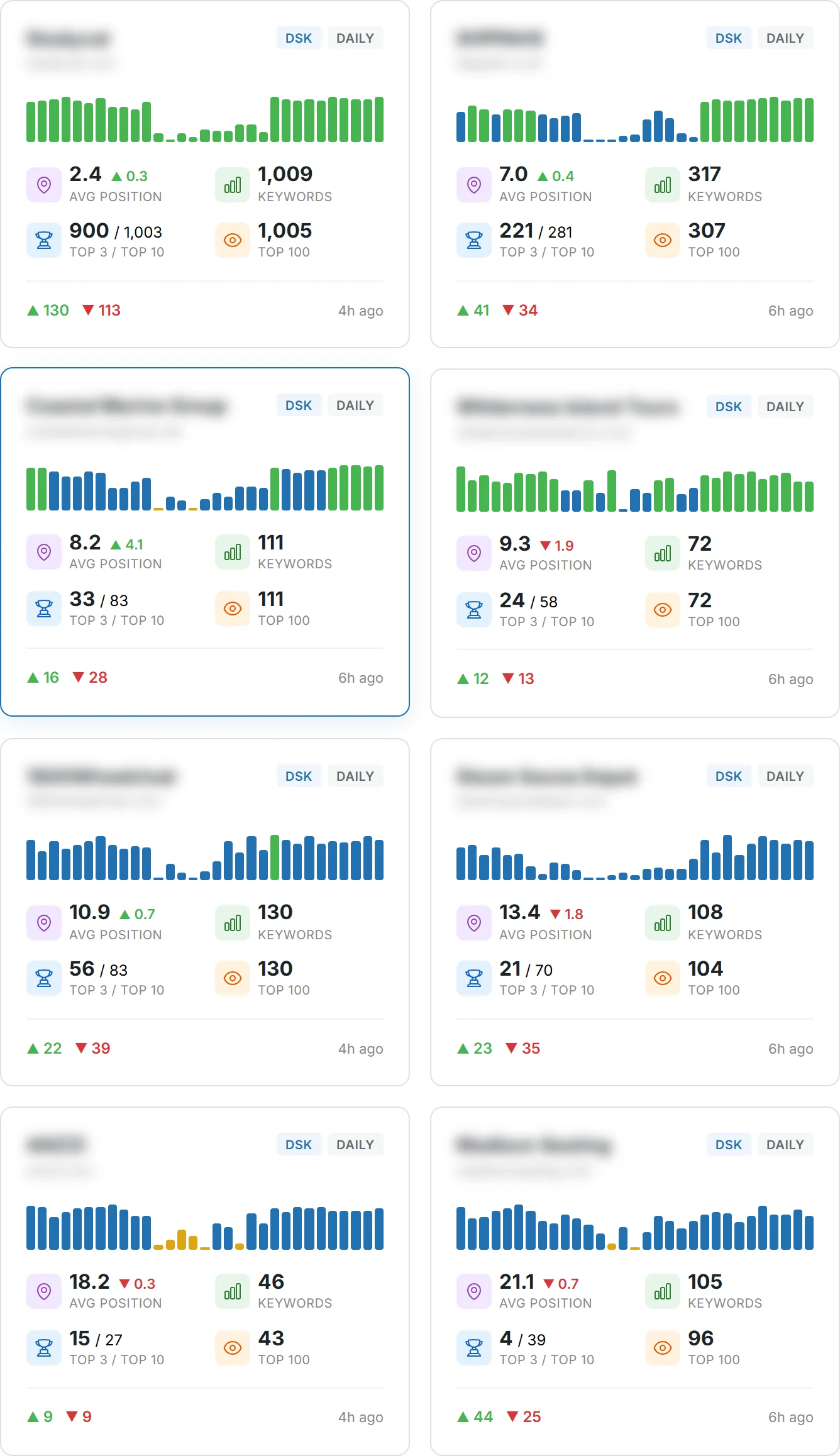
Curious how Google decides which pages appear first—and what you can do about it?
You will learn to assess your current site position with a Google-aligned tool that shows desktop and mobile keywords, visibility, and search volume.
Google explains there are no secrets to reach the top. Changes can take hours to months, so focus on crawlability, indexing, and people-first content.
This introduction previews practical steps: validate what Google can access, improve on-page content and technical basics, and measure results with consistent data.
Follow a workflow to check positions by device and country, compare against competitors, and act on gaps with clear value for users. For background on how Google evaluates signals, see a concise guide on how Google SEO works.
Key Takeaways
- Use a Google-aligned tool to track positions on desktop and mobile.
- Prioritize crawlability, indexing, and helpful content for users.
- Measure visibility, not just position, to connect to traffic and conversions.
- Expect changes to show in hours to months; be patient and consistent.
- Compare by device and region to spot actionable growth opportunities.
Understand how Google Search discovers, crawls, and indexes your pages
Crawlers follow links and sitemaps to find and add your pages to Google’s index.
The crawl-to-index pipeline starts when automated bots visit the open web and follow link pathways. Publishing accessible content on a logical site structure usually triggers discovery without extra steps.
Use the URL Inspection tool to see how Google fetches a page, what resources it can load, and which canonical is chosen. This helps you spot blocked CSS or JavaScript that would prevent proper rendering.
Crawlers, links, and sitemaps: how your pages get into search results
- Links remain the primary discovery path; sitemaps help for large or frequently updated sections.
- Descriptive URLs and logical directories clarify relationships and can improve crawl scheduling.
- Robots directives and noindex rules let you exclude low-value pages and save crawl budget.
Use the URL Inspection tool to see what Google sees
Inspect index status, last crawl date, and rendered HTML to troubleshoot gaps fast.
| Check | Why it matters | Action |
|---|---|---|
| Rendered HTML | Shows what the engine saw after loading resources | Unblock CSS/JS or fix lazy-loading that hides content |
| Index status | Confirms if the page is included in search engines | Submit for reindexing after fixes |
| Canonical | Identifies which URL Google prefers | Set correct canonical tags or use redirects |
| Sitemap coverage | Helps expose large or new areas | Update sitemap and submit in Search Console |
Next steps: review internal linking so every important page gets contextual links. Test geolocation or personalization to ensure the crawler sees required information, and document a repeatable process to diagnose blocked resources, soft 404s, and indexing delays.
Define success: what “website ranking” and visibility really mean
To measure progress, you must separate a single position from broader visibility and real traffic.
Position is a snapshot: one keyword’s rank in search results at a moment in time. It helps you spot wins and losses fast.
Visibility is an indexed score that weights many positions to estimate potential traffic. Use visibility to forecast impact and prioritize work.
Positions vs. visibility vs. traffic: the metrics that matter
- One rank can mislead; a portfolio of positions drives most traffic.
- Visibility indexes convert position data into estimated visits.
- Include search volumes, featured snippets, and SERP competition to explain outsized outcomes.
Desktop and mobile rankings: why both sets of results differ
Device-specific reporting matters because mobile and desktop layouts change click behavior.
“Track desktop and mobile separately — layouts, intent, and SERP features shift who sees and clicks your links.”
| Metric | Why it matters | Action | Key signal |
|---|---|---|---|
| Position | Quick detection of changes | Audit SERP features and content | Top 1 / Top 10 buckets |
| Visibility | Traffic potential estimate | Prioritize pages with high gain potential | Weighted index score |
| Traffic | Real user visits | Measure conversions and refine intent | Click-through and volume data |
Check your current standings with a Google-aligned rank checker
Start by probing your domain with a search tool that mimics real user contexts.
Enter your domain, pick the target region and language, then choose desktop or mobile to mirror the audience you want to reach.
Run the check and read the output
You will get positions, volumes, estimated traffic, and SERP features for each keyword and URL. Review CPC and traffic cost to judge opportunity and effort.
Monitor frequency and alerts
Set updates to 1, 7, 30, or 90 days, or view all-time history. Enable SERP alerts and start tracking to capture volatility and annotate changes over time.
- Export: CSV or PDF for audits and team sharing.
- Clusters: Group keywords by topic or URL for clearer analysis.
- Compare: Desktop vs. mobile outputs to spot device gaps in UX and content.
| Output | Why it matters | Action |
|---|---|---|
| Positions & volumes | Shows current result performance | Prioritize quick wins near top 10 |
| Traffic estimates & CPC | Reveals potential value | Balance organic work vs. paid tests |
| Distribution & visibility | Measures overall presence | Track trends to validate improvements |
| SERP features & competition | Highlights opportunities and risks | Optimize snippets and content to capture clicks |
Use Google Search Console to validate and enrich your ranking data
Validate third-party position data by comparing it directly to Search Console’s performance metrics for your pages.
Open the Performance report to filter by query, page, country, and device. These filters let you confirm clicks, impressions, and average positions with Google-originated data.
Query and page filters: dissect where visibility lags
Apply filters to isolate queries or pages with impressions but low clicks. This reveals quick wins like better titles or meta descriptions.
- Cross-check query-level clicks and impressions against your rank checker.
- Segment by country and device to spot regional or mobile gaps.
- Annotate major changes so you can tie actions to timing.
Coverage, sitemaps, and enhancements
Monitor Coverage to find indexing errors and warnings that suppress visibility. Submit sitemaps for key pages to speed discovery.
Use URL Inspection to verify how Google fetches and renders a page, and check structured data reports to see enhancement eligibility. Remember: changes can take hours to months to show in google search.
| Area | Why it matters | Action | Timing |
|---|---|---|---|
| Performance (query/page) | Validates organic clicks & impressions | Compare with tool data; segment by device/country | Immediate to weekly |
| Coverage | Shows indexing errors | Fix errors, request reindexing for affected pages | Days to weeks |
| Sitemaps & URL Inspection | Improves discovery and render checks | Submit sitemaps; inspect problem URLs | Hours to weeks |
| Enhancements | Controls rich result eligibility | Fix structured data and monitor reports | Weeks to months |
Tip: Build dashboards that merge Search Console information with your tool’s visibility and other data. Use trends, not single snapshots, to refine keyword-to-page mapping and content updates.
website ranking
Look at trends across queries and devices to see whether your work actually helps users find information.
Use the Rank Checker to compare current and historical rank data for desktop and mobile. Track the top 100 positions and note visibility shifts for the site and for specific URLs.
Historical trends tell you if content edits, technical fixes, or UX updates create sustained gains. Correlate time-stamped changes with movement in reports to build a clear cause-and-effect narrative.
Focus on pages that drive the most visibility. Identify lagging pages and prioritize fixes that help users first. Monitor featured snippet captures and other SERP elements that raise clicks beyond classic results.
- Compare competitor trajectories to see if your gains beat the market.
- Segment by device and location so content and experience match user expectations.
- Set precise visibility goals and track whether shifts are seasonal or algorithm-related.
Make monitoring routine: daily checks for volatility, weekly trend reviews, and annotated reports. That way, rank becomes a strategic signal tied to business outcomes, not a vanity metric.
Local and mobile nuances: tailor tracking to users’ location and device
Local context and device type change what people see in search. Run city-level checks so you know the precise search results your customers encounter. The Rank Checker supports geolocation for cities and regions across 155 countries and separates desktop from mobile data.
Geolocation checks to see results for specific cities or regions
Configure geolocation to mimic the exact place a customer searches from. This captures hyperlocal competition, demand, and SERP features like the local pack and maps.
Mobile-first realities and why mobile rank differs from desktop
Analyze device-specific outputs to see how mobile indexing, SERP layout, and intent shift affect visibility and traffic.
- Set local targets: map queries with city modifiers to the right pages so your domain shows the right content for each area.
- Compare devices: spot mobile vs. desktop gaps to catch slow loads or intrusive interstitials that hurt mobile performance.
- Monitor local features: track map packs and proximity signals that change how users choose, even when organic positions stay steady.
“Tailor your tracking by place and device to ensure the right pages serve local intent and capture nearby users.”
Map keywords to pages: target intent and avoid cannibalization
Map queries to specific pages so each user intent finds a clear destination.
Group related keywords into clusters that match your business goals. Each cluster should link to the most relevant page and reflect the user journey.
Group keywords by categories, clusters, and business goals
Organize keywords by topic and priority. Use the tool to view ranked URL trends and competitor SERP analysis to fill gaps.
Choose primary vs. supporting keywords for each URL
Assign one primary keyword per url and pick supporting terms that cover variations in intent. This keeps authority focused and prevents content overlap.
- Validate winners by checking position trends and the ranked page data.
- Maintain a living inventory of keyword-to-page assignments to avoid future conflict.
- Measure cluster-level visibility and traffic by device and geography to update targets.
Govern updates, redirects, and new content so your site preserves relevance and each page answers the right queries.
On-page essentials that influence how you appear in search
On-page signals tell search engines and people what your pages are about. Tune titles, snippets, and structure so each result clearly matches user intent.
Write clear title tags and meta descriptions that earn clicks
Keep titles concise and unique. Use primary terms near the front and add a clear benefit in a few words.
Meta descriptions should summarize the page in plain language. Google may use on-page text instead, so make the first sentences helpful and descriptive.
Use descriptive URLs and breadcrumbs that reflect site structure
Create readable URLs that mirror directories and topics. A clear url helps users predict what a page contains and aids indexing.
Apply breadcrumb markup so search results can show logical context and help users navigate to related pages.
Craft readable, people-first content aligned to user queries
Write short paragraphs, clear headings, and scannable lists. Focus on answering the query directly and avoid stuffing keywords into copy.
“Write for people first; structure for search second.”
- Use headings to signal topic hierarchy.
- Link contextually to related pages to add relevance and guide discovery.
- Update time-sensitive words and facts to keep content trustworthy.
| Element | Why it matters | Action |
|---|---|---|
| Title tag | Controls first impression in search | Make unique, concise, benefit-led titles |
| Meta description | Summarizes the page for users | Write clear, compelling snippets; test CTR changes |
| URL & breadcrumbs | Communicates structure and context | Use readable directories and add breadcrumb markup |
| Headings & body content | Answers queries and improves readability | Use short paragraphs, lists, and natural synonyms |
For guidance on crafting people-first content that performs in search, see this practical guide: create content that ranks.
Technical foundations: make your site easy to crawl and understand
Start by locking down the technical basics so crawlers can see and render your public pages accurately.
Ensure CSS, JavaScript, and images are accessible to automated engines so the rendered page matches the user view. Use the URL Inspection tool to verify rendered HTML for representative templates and critical pages.
Reduce duplicate content by consolidating variants. Choose one canonical URL per piece of content and enforce it with rel=”canonical” or 301 redirects. Duplicates waste crawl budget even if they are not spam.
Organize directories and descriptive URLs to signal topical groups and help search engines set crawl frequency. Standardize internal links to preferred URLs to reinforce canonical intent.
Keep robots and meta directives aligned with your indexing goals. Monitor server status codes, page speed, and uptime to protect crawl efficiency and user satisfaction.
Document changes and annotate deployments so you can map technical fixes to shifts in crawling, indexing, and performance. Finally, schedule regular audits to keep these foundations current.
Images and videos: optimize media for richer search results
Align visual assets with the most relevant text so both people and engines see how media supports your message.
Place high-resolution images directly beside the paragraph they illustrate. This makes the context clear for users and helps search understand the connection between the visual and the page’s main information.
Use high-quality visuals and descriptive alt text
Write short, specific alt text that explains what the image shows and why it matters. Keep it factual and avoid keyword stuffing; a single clear sentence is often enough.
Create video pages with strong titles and descriptions
Embed videos on a dedicated page with a descriptive title, a helpful summary, and a transcript or captions. That gives people a quick preview and supplies indexable words for search engines.
- Prioritize media that adds clear informational value, not decoration.
- Compress files for fast delivery without losing perceptible quality.
- Use structured data when possible to qualify for rich appearances.
- Measure impressions and clicks from image and video surfaces to validate impact.
“Good media placement turns passive visuals into useful information that guides users toward answers.”
SERP features and snippets: win more space in results
Start by cataloging the rich features that show up for queries you care about; this reveals immediate opportunities.
Use the Rank Checker to list which features appear in search results for each query. Note featured snippets, images, videos, knowledge panels, and local packs.
Structure your content to match snippet patterns. Give short definitions, numbered steps, clear lists, or tables near the top of the page. These formats make it easy for Google to extract answers from your words.
How to act on snippet opportunities
- Audit queries and record the feature type and winning URL.
- Craft concise answer blocks with precise wording that mirrors user phrasing.
- Keep the surrounding page thorough so click-throughs stay useful.
“Concise, well-structured answers increase your chance to capture featured space and help users faster.”
| What to track | Why it matters | Action |
|---|---|---|
| Feature type | Shows visual real estate in results | Tailor short answer blocks to that format |
| Winning URL | Reveals competitor phrasing and layout | Compare and improve your headings and examples |
| CTR impact | Measures value beyond positions | Iterate wording and placement to boost clicks |
Monitor volatility and iterate. Feature layouts change often, so test wording and placement, then use the tool’s SERP analysis to validate gains in rankings and clicks.
Competitor benchmarking: compare rankings and strategy
Compare how rival domains perform on shared queries to spot realistic opportunities for improvement.
Start by adding competing domains to your competitor set. Track positions and visibility for overlapping keywords so you see where you already contend and where others dominate.
Track competing domains and keyword overlaps
Use domain- and keyword-level data to map overlaps. Note which sites repeatedly capture snippets or vertical features. That tells you what formats and depth succeed for each topic.
Spot gaps where you can outrank and capture traffic
Identify gaps by intent: short answers, long-form guides, or product pages. Estimate potential traffic impact from keyword volumes and competitor positions, then translate those gaps into content briefs, technical tickets, or outreach plans.
- Monitor position changes over time to separate noise from strategic shifts.
- Review competitor SERP features to understand click allocation.
- Validate execution by watching targeted URLs climb and hold in competitive clusters.
“Tools like AWR provide granular, expert‑favored reporting that makes competitor monitoring practical and repeatable.”
Track over time: visibility trends, annotations, and reporting
Track long-term visibility so you can tell real growth from short-term noise.
Use daily, weekly, and monthly charts to separate volatility from steady progress. Daily views catch spikes and drops. Weekly and monthly graphs reveal seasonality and sustained gains.
Daily, weekly, and monthly views to see progress and seasonality
Set the tool to 1, 7, 30, or 90 day windows and add an all-time series. That helps you see whether a change shows up in a day or unfolds over months.
Export reports and annotate updates to tie actions to results
Export CSV or PDF for audits and stakeholder updates. Add annotations for deployments, content edits, and Google updates so teams can connect actions to observed results.
- Monitor: daily snapshots for alerts, weekly trends for tactical decisions, monthly reports for strategy.
- Measure: visibility as an indexed score to estimate traffic potential alongside rankings and clicks.
- Segment: device, location, and clusters so reports reflect how users interact with your site.
| Frequency | Action | Timing |
|---|---|---|
| 1 day | Investigate sudden drops (use SERP alerts) | Immediate |
| 30 days | Assess content and UX changes | Weeks |
| All-time | Contextualize current trends in long cycles | Months to years |
Align report cadence with decision timelines so insights feed sprint planning and roadmaps. Configure SERP alerts to notify you of significant shifts and refine measurement as your program matures.
Promote wisely: amplify content without overdoing it
Plan promotion so new pages reach interested audiences without overwhelming them.
Promote new content through social channels, relevant communities, and newsletters to help people find information faster.
Leverage word of mouth by delivering consistent value so audiences naturally share your site and mention your business.
Leverage social, communities, and word of mouth
Tailor messages to each community’s norms. Contribute helpfully rather than broadcast, and add one clear link back to the best resource.
Keep ads and interstitials from hurting user experience
Avoid aggressive promotion. Ads or interstitials must not block access to information or frustrate users. Preserve trust and usability first.
“Promotion should guide people to useful information, not interrupt their access.”
- Measure referral and organic impact to learn which channels drive durable value.
- Coordinate promotion with publication schedules to build momentum.
- Establish an approval process to protect brand and user experience standards.
Iterate based on engagement metrics and feedback. Small, respectful outreach often outperforms loud, repetitive pushes on the web and in search.
Set realistic timelines: when you’ll see results from SEO changes
Set clear expectations for when changes will begin to show so stakeholders know what to watch.
Some fixes are fast and visible in hours or days. Google notes many changes can also take several months to fully reflect in search.
Why some changes take hours and others take months
Technical updates like redirects or meta edits can be crawled and reflected quickly. They often produce measurable shifts in a short time.
By contrast, broad content or architecture work needs repeated crawls, user signals, and trust to grow. Those moves commonly require weeks to months before you truly see the full results.
Iterate based on data if outcomes fall short
Wait a few weeks to assess progress, then use clicks, impressions, and visibility to judge impact. If outcomes diverge from forecasts, diagnose crawl access, competition, or snippet losses.
- Balance patience with proactive checks so you don’t chase noise.
- Document the process and decisions so future work benefits from current learnings.
- Plan tests with a hypothesis, success metrics, and review checkpoints tied to business goals.
“Treat SEO as a repeatable process: test, measure, iterate, and communicate timelines to people who need to act.”
Conclusion
Close the loop: measure, improve, and document so improvements compound over time.
Use a reliable, Google-aligned checker alongside Search Console to validate visibility and traffic. Map queries to pages, avoid cannibalization, and track clusters so gains stack instead of scatter.
Optimize titles, snippets, media, and internal links to earn more clicks in search. Benchmark competitors, pursue realistic opportunities, and report with exports, alerts, and annotations to tie actions to outcomes.
Respect timelines: some wins appear fast, others take months. Focus on what helps people and search engines understand your pages, and iterate the process to build lasting website ranking and durable traffic.
FAQ
How does Google Search discover and index my pages?
Google uses crawlers to follow links and read sitemaps so it can discover your pages. Crawlers fetch HTML, CSS, JS, images, and structured data. If resources are blocked or a page is marked noindex, Google won’t include it in search results. Use a sitemap and internal links to help discovery, and check the URL Inspection tool to see what Google sees for any URL.
What does “website ranking” and visibility actually mean?
Position is the spot a URL holds in search results for a query. Visibility is a broader metric that weighs those positions by search volume and expected click-throughs, so you can understand potential traffic. Traffic is the actual visits those positions drive. Track all three to measure success and relevance across devices and locations.
How can I check current standings with a Google-aligned rank checker?
Enter your domain or URL, target region, language, and device (desktop or mobile) into a rank checker. Review positions, search volumes, estimated traffic, and SERP features like snippets or images. Set frequency options and alerts to monitor volatility and capture trends over time.
Why should I use Google Search Console for performance data?
Search Console shows query, page, country, and device filters so you can analyze impressions, clicks, CTR, and average position directly from Google’s data. It also reports coverage issues, sitemap status, and enhancements (like structured data) that influence indexing and visibility.
How do local and mobile differences affect my tracking?
Search results vary by geolocation and device. A query can return different results in different cities or on mobile vs. desktop. Run geolocation checks to see city-level SERPs and prioritize mobile-first checks since Google indexes and ranks mobile content differently.
What’s the best way to map keywords to pages without cannibalizing intent?
Group keywords into categories and clusters by user intent and business goals. Assign one primary keyword to each URL and use supporting keywords on that page. This reduces overlap and helps search engines and users find the most relevant page for each query.
Which on-page elements matter most for appearing in search?
Focus on clear title tags and meta descriptions to earn clicks, descriptive URLs and breadcrumbs to show structure, and readable content that answers user queries. Use headings, structured data, and concise paragraphs so both people and search engines understand your pages.
What technical steps make my site easy for crawlers and search engines?
Ensure CSS, JS, and image resources are accessible. Fix crawl errors, reduce duplicate content, and set canonical tags or redirects where needed. Improve site speed and mobile usability so crawlers can index content reliably and users have a good experience.
How should I optimize images and videos for search?
Place high-quality visuals near relevant text, add descriptive alt text, and use meaningful file names. For videos, create dedicated pages with clear titles, descriptions, timestamps, and structured data so they can appear in rich results and drive more visibility.
How can I target SERP features like featured snippets?
Identify which features currently appear for your target queries. Structure answers as concise, direct responses, use lists or tables where appropriate, and optimize headings and markup so search engines can extract those snippets from your content.
How do I benchmark against competitors effectively?
Track competing domains, compare keyword overlaps, and spot gaps where competitors aren’t satisfying user intent. Use that insight to create better pages that capture unmet demand and improve your share of organic traffic and visibility.
What reporting cadence should I use to track progress?
Use daily data for volatility and quick issues, weekly views for tactical changes, and monthly reports for strategic trends and seasonality. Export CSV or PDF reports and annotate them to tie specific actions to performance changes over time.
How should I promote content without hurting user experience?
Amplify content via social channels and niche communities, but avoid intrusive ads or interstitials that block content. Focus on earning natural links and shares through useful, linkable content that aligns with user intent and business goals.
When will I see results from SEO changes?
Some updates (like fixing a blocked resource) can lead to reindexing within hours or days, while content and authority improvements often take months. Measure outcomes, iterate based on data, and set realistic timelines tied to the complexity of the change and competition for target queries.